


Spot Assist Skydiving Tool
4.6125.00 Reviews
App Specs
- Version
- android-3.0.5
- Updated On
- License
- Free
- Downloads
- 10,000+
- Developer
- Livewings Inc
- Categories
- Weather
- Platform
- Android
Screenshots
 Analysis by AppCompare
My first impression of Spot Assist Skydiving Tool is that it has a much narrower purpose than a typical weather app, and that focus is its strongest reason to try it. The app is made for skydivers who need weather information interpreted around a jump: not just whether the day looks sunny, but what the winds and possible exit area mean for planning. If you jump regularly, that kind of focused glance can be more useful than scrolling through a general forecast.
The appeal on a first jump day
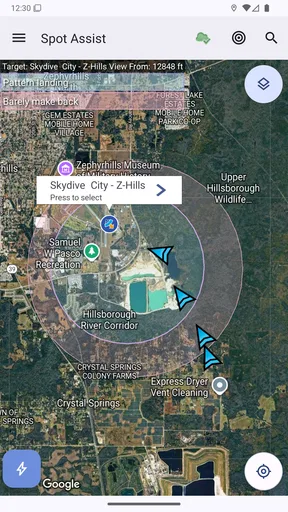
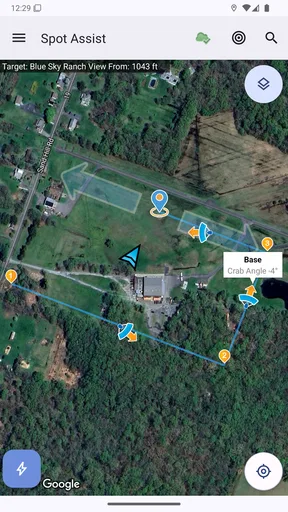
On a first visit, the appeal is easy to understand. Spot Assist brings skydiving-related weather details into one place, including winds, an indicated optimal exit area, and a pattern. That combination gives the app a practical role in the moments before a jump, when a broad forecast may leave you with more questions than answers.
Picture a familiar weekend plan: you reach the drop zone, the group is discussing whether conditions are suitable, and you want a quick second look before committing to the day. This is where a specialized tool can help you focus your attention on the conditions relevant to skydiving instead of treating the forecast like an ordinary outdoor outing. I would use it as one input in that conversation, not as a substitute for the drop zone’s procedures, qualified judgment, or current safety checks.
The distinction matters because a weather display can make a decision feel more certain than it really is. Conditions change, and an app cannot assess every local factor or take responsibility for a jump. My useful habit would be to check the information early, compare it again closer to the planned activity, and follow the people and procedures responsible for the operation. That keeps the app in its proper role: a planning aid rather than a green light.
What makes it different from a general forecast
Livewings Inc makes this a weather app with skydiving in mind, rather than a general-purpose forecast dressed up for a niche audience. In the usual weather-app routine, I might check rain, temperature, or a simple wind forecast and then try to work out what matters at a jump site. Here, the intended focus is closer to the question a skydiver actually has: how do the wind picture and exit-area guidance relate to the planned jump?
That focus is also a trade-off. Someone who only wants to know whether to carry a coat will probably get more value from a conventional forecast, while a skydiver may appreciate an interface organized around the activity. The app’s store summary points to winds, an optimal exit area, and a pattern, so I would judge it by whether those elements help me prepare and discuss a jump—not by whether it replaces every weather source I use.
What I would check, and when
I would start by using the app before leaving home, then revisit it once I am at the drop zone. The first check helps me decide whether the day deserves closer planning; the later one gives me a chance to notice whether the picture has changed. I would pay attention to how the exit-area guidance and pattern relate to the wind information rather than treating any single display as the whole answer.
Worth Reading Before You Choose

Flipboard Shows What News Apps Must Do Beyond the Feed

Switching to Android Auto Means Rethinking Your Driving Routine

Google Calendar Makes a Crowded Week Easier to Manage

Ludo King Makes the Most of the Minutes Between Plans

Baby Panda World Brings Quick Play to Modern Phones, but Its Game Library Feels Busy

ESPN’s Live Game View Makes Following Close Games Easier
One useful, non-obvious approach is to make a small routine out of those checks. If I look only once, I may remember a reassuring snapshot and overlook that conditions have shifted. Checking at two distinct points turns the app into a comparison tool: I can bring a concrete question to the people making the operational call instead of arriving with only a vague impression of the forecast.
I would also avoid assuming that a visually clear pattern is a promise about what will happen during a jump. Guidance is most helpful when I understand it as a planning aid and keep it alongside local judgment. That cautious reading is especially important for newer jumpers, who may not yet know which details are routine and which deserve a closer conversation with an instructor or the drop zone.
How it earns a place over time
A specialized app has to prove its value after the novelty of seeing a skydiving-focused display wears off. For me, the recurring benefit would be a quicker, more relevant way to frame a weather check on jump days. It is not an app I would expect to open every morning like a general forecast; its value is tied to the times when I am actually considering a skydive.
That makes the best audience fairly clear. Regular skydivers, people who travel to jump sites, and newcomers who want a more focused starting point may find a steady use for it. Someone who jumps only occasionally might install it for a trip, then leave it untouched for long stretches. That is not necessarily a flaw, but it does mean the app’s long-term value depends on whether skydiving is already part of your routine.
At the time I’m writing, it is free to install, with optional in-app purchases listed from $0.99 to $5.99 per item. It has a 4.6 average from 639 ratings, and the listing shows more than 10,000 installs. Those figures suggest a modest but established niche audience; they do not tell me whether its guidance suits every drop zone, so I would still check that it fits the way I plan jumps.
Maintenance, friction, and sensible limits
The main maintenance burden is less about complicated upkeep than about keeping my own routine sensible. I would want to make sure I am looking at current conditions when I use the app, rather than relying on a check made hours earlier. I would also keep the tool in its lane: it can help me organize weather questions, but I would not use it to overrule local procedures or experienced advice.
There is a practical limitation for anyone who expects one weather app to cover every need. Spot Assist is specialized, so it is not the obvious everyday choice for forecasts unrelated to skydiving. Nor would I rely on a single presentation of wind or exit guidance as a complete assessment of safety. If I wanted a broad view of the day, I would pair it with a general forecast; if I wanted an operational decision, I would defer to the responsible people on site.
The current Android version is android-3.0.5, and the stated minimum operating system is 10. The content rating is Everyone. Those details make it straightforward to assess basic compatibility and audience, but they do not change the more important question: whether the focused information matches the way you prepare for a jump. I would check device compatibility before installing, then judge the app on a real planning day rather than on a quick first glance.
Who should keep it—and who can skip it
I would keep Spot Assist Skydiving Tool if I were jumping often enough to want a repeatable, activity-specific weather check. It makes most sense for someone who already understands that a forecast is only one part of a safe plan and wants a focused way to think about winds, exit-area guidance, and the pattern. For a first-time skydiver, it may be useful as a prompt for questions, but I would not treat it as a lesson or a decision-maker.
I would skip it if I rarely skydive and mainly need ordinary forecasts, or if I expect an app to settle whether a jump is safe without consultation. A general weather app is a better everyday companion for broad plans, while the drop zone and qualified staff remain the right reference for operational decisions. That is not a criticism of this tool so much as a reminder that specialization helps only when the task matches.
The app was released on January 13, 2014, and its niche focus gives it a clear identity rather than trying to be everything to everyone. The question I would ask before keeping it installed is simple: do I regularly need a skydiving-centered view of conditions? If yes, a focused tool can become part of a useful pre-jump habit. If no, it may be one more icon I open once and forget.
Ever found yourself daydreaming about soaring through the sky, but concerned about the weather conditions? Well, let me introduce you to the Spot Assist Skydiving Tool. This app is like having a meteorologist in your pocket, specifically tailored for the adrenaline junkies among us.
What’s the Buzz About?
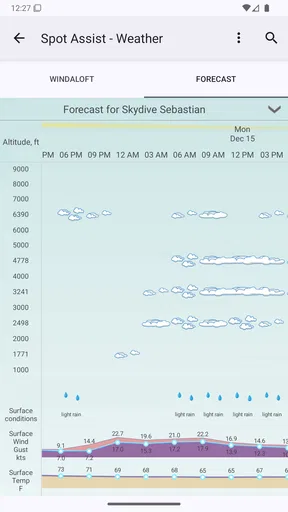
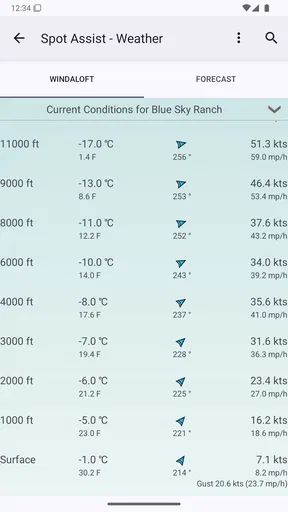
Okay, so here’s the deal. Spot Assist Skydiving Tool is not just your average weather app. It’s designed with skydivers in mind. Imagine being able to check wind patterns, cloud cover, and temperature at different altitudes all in one go. Pretty nifty, huh?
When you launch the app, you’re greeted with a user-friendly interface that makes navigation a breeze. It’s like the developers knew exactly what skydivers need - quick, accessible information without any fuss.
Key Features You’ll Love
Let’s dive into the features that make this app a must-have for any skydiving enthusiast:
- Wind Speed and Direction: Get real-time data on wind conditions at various altitudes, ensuring you’re jumping into the best possible conditions.
- Cloud Cover: Nobody wants to jump through thick clouds. This app provides a detailed overview of cloud cover to help you plan your jump.
- Thermal Activity: For those into paragliding or gliding, knowing about thermal activity is crucial. The app dishes out this info effortlessly.
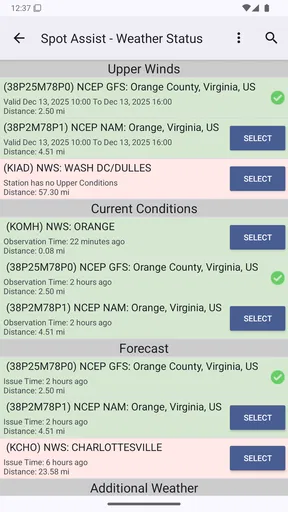
- Notam Information: Stay informed about airspace restrictions and other critical notices that could affect your jump.
My Personal Experience
So, I took the app for a spin on a recent skydiving trip, and let me tell you, it was a game-changer. The accuracy of the weather data was spot on. I particularly loved how it highlighted changes in wind speed as I ascended. It’s like the app was one step ahead, keeping me informed and safe.
The cloud cover feature saved me from a potentially cloudy jump. It was like having a buddy who’s always on the lookout for my best interest. Plus, the push notifications are a godsend. You get alerts about changing conditions, making it easier to adjust plans on the fly.
Why You Should Give It a Shot
If you’re serious about skydiving, this app is worth every penny. It’s not just about the thrill of the jump but ensuring you’re doing it safely and smartly. The Spot Assist Skydiving Tool equips you with the knowledge you need to make informed decisions.
Moreover, the app’s community feature is a neat addition. You can connect with other skydivers, share experiences, and get tips. It’s like having a support system right at your fingertips.
So, whether you’re a seasoned skydiver or just starting out, this app is a worthy companion. It’s intuitive, reliable, and packed with features that genuinely enhance your skydiving experience.
In conclusion, don’t just take my word for it. Give the Spot Assist Skydiving Tool a try. It might just become your go-to app every time you plan to take to the skies.
Pros
- Intuitive interface for easy navigation.
- Real-time weather updates enhance safety.
- Customizable settings for personalized use.
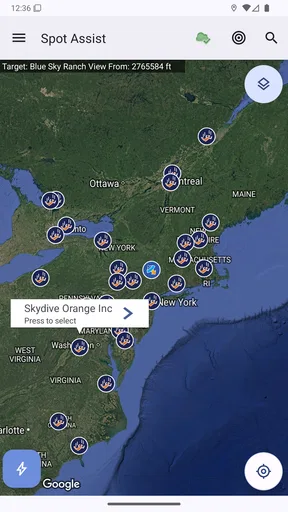
- Accurate drop zone mapping feature.
- Offline mode for remote locations.
Cons
- Limited free version features.
- Some features require stable internet.
- Occasional GPS inaccuracies.
- Not beginner-friendly without guidance.
- Battery draining on prolonged use.
FAQs for Spot Assist Skydiving Tool
What is Spot Assist Skydiving Tool used for?
Spot Assist Skydiving Tool is designed to help skydivers accurately plan their jumps. It provides real-time weather updates, wind patterns, and landing predictions to ensure a safe and precise jump. The app integrates GPS technology to assist in pinpointing the optimal exit points and landing zones.
How does the app improve skydiving safety?
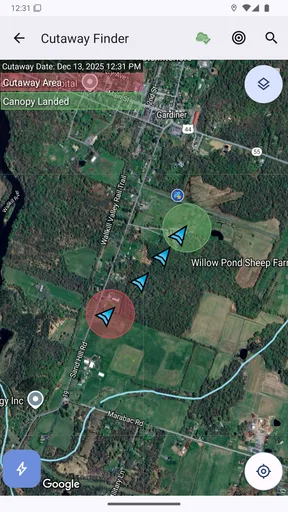
The app enhances safety by offering detailed weather forecasts and wind data which are crucial for jump planning. It allows users to input specific jump details and uses algorithms to predict landing spots. This information helps skydivers make informed decisions, reducing the risk of landing mishaps.
Is Spot Assist Skydiving Tool suitable for beginners?
While Spot Assist can be used by skydivers of all levels, beginners may find it particularly beneficial due to its user-friendly interface and comprehensive guides. The app provides essential data that can help new skydivers understand the dynamics of wind and weather conditions, aiding their learning process.
Does the app require an internet connection?
Spot Assist Skydiving Tool requires an internet connection to fetch real-time weather updates and map data. However, some features like GPS tracking may work offline. It’s recommended to check forecasts and wind patterns before heading to locations with limited connectivity.
Are there any subscription fees for using the app?
Spot Assist Skydiving Tool offers both free and premium versions. The free version includes basic features, while the premium version unlocks advanced functionalities such as detailed wind analysis and extended weather forecasts. Subscription fees are generally affordable, offering good value for avid skydivers.


